| First Page | Second Page |
Third Page |
The first thing needed is a good UV source. I have heard of people using the sun to expose boards but I have not tried this. I imagine the UV levels are not consistent especially in winter and unfortunately the sun is not available at all times. There are commercial units but these are quite pricey. Most recommended home made designs are similar to the commercial designs in that they consist of two or more fluorescent tubes used to make a light box. The top of the the box is glass and the board is faced down on the glass over the tubes. This is then covered by a lid which protects the operator from the UV. Some designs mount one or two fluorescent battens on a board which has legs. The battens are facing down over the PCB which is face up.
Either way you are up for the cost of some battens and fluorescent tubes, which can be expensive. There is also a question mark over the kind of UV levels and wavelengths of various tubes. I don't know enough about this but I believe modern fluorescents for lighting contain little UV. Apparently disco blacklights are not very good either as they have the wrong wavelength of UV. Tubes known to have very strong UV have little or no phosphor, such as solarium tubes or tubes used to kill bacteria. These tubes emit powerful UV that can burn skin and damage eyes. One popular design that was featured a few times in Silicon Chip Magazine uses the tubes used to attract insects in bugzappers, but these tubes don't seem to be available from Bunnings anymore and I don't know where to get them. If you find these tubes you will still need to buy a socket to mount the tube as well as a starter and ballast. This definitely involves mains wiring and where I live must be done by someone who has the proper electrical licence. It was for these reasons I went looking for an easier alternative.
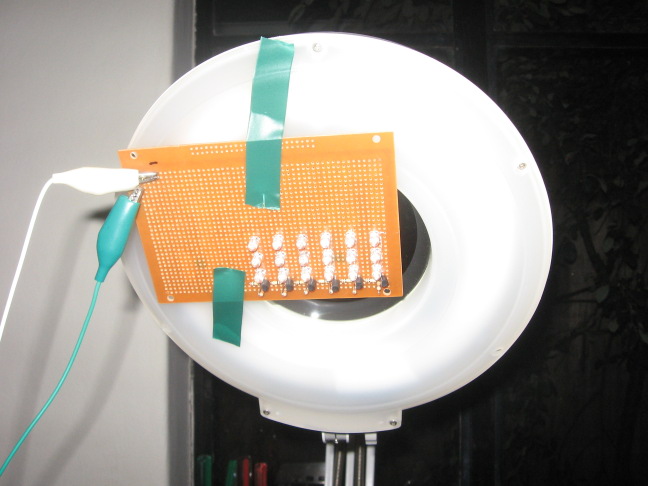
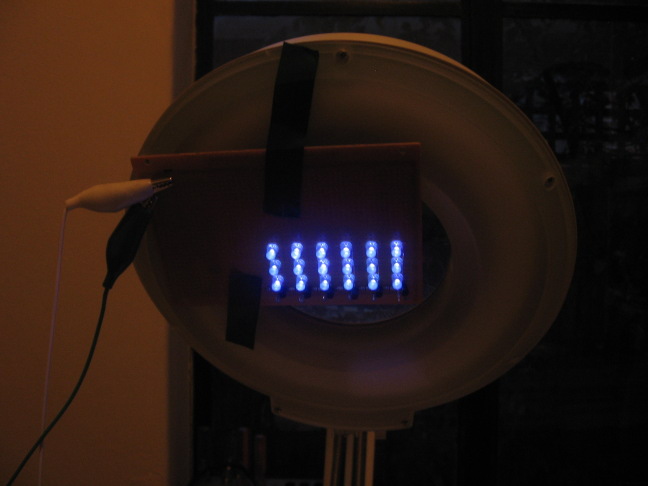
It just so happened that a friend of mine ordered a large number of UV LED's which were for PC case decoration. Recently I had been looking to buy some of these but they were expensive from local retailers. Using simple single single transistor constant current sources for every 3 LED's I built a simple LED array lamp on prototype board. If I get time I will put up a schematic. The array will run on 12V to 24V DC, In this case a 12V Sealed Lead Acid battery.
| This photo shows the UV LED array when it is switched off. To position the lamp effectively over the board to be exposed I simply tape the array to my pantograph style illuminated magnifier. This way I can easily adjust the height of the lamp over the work. I am not sure how safe it is to look into the LED array when it is on. I usually leave the room when an exposure is being. If one needs to look at the beam for any amount of time you should wear eye protection such as sunglasses that have an approved UV rating. As you can see from the photo the battery is connected to the lamp with mini alligator leads. | |
| This photo was taken without a flash with the LED array switched on. Although the LED's appear blue in the photo they look violet in real life. Of course most of their output is in the invisible UV spectrum, as anything under the lamp the is fluorescent glows angrily, especially bleached paper which glows bright blue. I assume either the camera CCD picks up the invisible UV as a blue colour, or it is simply unable to render the pinkish violet properly due to the particular white balance selected, which as I recall was optimised for indoor use for tungsten bulbs. | |
The photomask is an image of the artwork that the photosensitive PCB is exposed through. But before we look at the photomask we need to briefly discuss the types of photoresists used as this will determine how we print the photo-mask. Photoresist is a chemical coating on a copper clad board that undergoes a change when exposed to UV radiation. This coating is then developed in a developer solution just like a photograph. The photoresist washes away in the areas where copper is not wanted, leaving the copper exposed to the etchant. The remaining photoresist forms the tracks and pads of the artwork and will resist the etchant solution.
Photoresists can be divided into two categories, positive and negative photoresists. A positive photoresist is exposed using a positive photomask which is the default for a laser printer, ie the tracks and other artwork are dark (opaque) and the areas free of copper are light (transparent). Examples of positive photoresists are the spray on photoresist or one of many presensitised boards. The presensitised boards are sold under a number of brand names (such as Kelan®, Kinsten® and others) or often here in Australia as a generic product (the one I happened to use is from Dick Smith Electronics). Typically the coating is dark green. As for negative acting photoresists, the only brand I know of is DuPont's Riston® (see 1, 2). The RCS Radio site has a wealth of information on making PCB's using Riston as well as making and designing PCB's in general, I highly recommend it. Their Riston coated boards, developer and stripper are also available from Jaycar Electronics. In the negative process using Riston, the photomask is a negative of the artwork, with light areas for tracks and pads and dark areas for unwanted copper. The procedure is almost the same as the positive method. The exposed areas are 'UV hardened' whereas the unexposed areas are washed away by the developer. There are other subtle differences in the processes that will be disscussed later.
We need a photomask to be high resolution with sharp edges to allow fine components and tracks to be imaged. Also to get a reliable exposure we need the dark areas to allow almost no UV to pass through. Different coatings have different sensitivities to UV light and the threshold at which an area will undergo change is impossible to predict. We want to be able to reliably expose the board with a strong UV source to guarantee development of exposed areas without risk of exposing the areas we don't want to develop. We are not trying to do landscape photography so we don't want any shades of grey in the exposure, just a silhouette of the artwork. Almost as important is the need for the light areas to be good transmitters of UV. If not then we must increase exposure time and intensity, which leads to the previous problem of exposure through the dark areas as well as the risk of the artwork blurring (ie: from diffraction or accidental movement). Also any issues to to with uneven illumination by the UV source will be worsened.
Let us consider the medium first, which is the light area the UV must pass through. Traditionally artwork was drafted by hand and then enlarged and photographed using using orthographic film to create a negative or positive black and white transparency (see history) and sometimes this technique is used today but the film is imaged from a laser printout and then photographed. This has the advantage that the printout can be larger than the artwork and the photo can the be reduced to scale. this allows a higher resolution than is normally possible from a laser printer. This makes an excellent photomask as the dark areas are very dark and the light areas are completely transparent however one must have a darkroom and other photographic paraphernalia, which is very rare in the age of the digital camera. Generally we must produce a photomask on our home printer. A brief word should be mentioned about common printer paper. Paper these days, while appearing very white in colour, is extremely opaque. This is a good thing for printing text and pictures, as we can't see what is printed on the back of the page or on the page below, which would be very distracting. Also, most printer paper contains something that actually makes it fluorescent. If you shine UV on printer paper it glows bright blue. The same isn't true of paper, for instance newspaper doesn't fluoresce. I don't what causes this, but all conventional printer and copy paper is like this, perhaps it is the bleach. This is bad news for UV exposure as it guarantees paper will not transmit UV, making it useless. You can check this by shining UV onto a piece of paper through another piece of paper. The paper you shine it through will glow brightly but the paper underneath won't glow at all.
Most sources advise using transparency film like the kind used for overhead projectors (traditional acetate sheet was used). Bear in mind that there are different media for different printers. Some are designed for photocopiers or laser printers, and using the wrong one in a laser printer or photocopier will result in it melting onto the machines roller, leading to an expensive repair bill. Also, one must use a special kind in inkjet printers otherwise the ink won't dry and might not adhere at all, ending up everywhere else except where it should be. Most people use transparency film with a laser printer or photocopier, although I have heard of some using inkjet transparency. My only qualm with this is that where I live the price of transparency paper is exorbitant. Thanks to this page I got the idea to use polyester drafting film, which is often sold as swiss tracing paper. I have found it to be very transparent to UV and can be laser printed to with using any special settings. The only downside is it won't work with an inkjet as the ink won't dry and if it does it is still patchy. I have used this and it gives very high contrast results.
As for the dark areas most people agree toner from a photocopier or laser printer is a good choice and this is all I have used. theoretically ink might work but not all inks are necessarily UV opaque. Toner is basically fusible plastic and when held to the light looks totally dark. This does not mean though we should use ridiculous exposure times as it is possible there are small holes it could pass through. One thing also worth mentioning is that we generally place the print in direct contact with the board being exposed. This means the photomask is as close to the board as possible, increasing the resolution and contrast of the board by avoiding blurring from diffraction of the UV light and other effects caused by the thickness of the media. Generally PCB layout software will print the artwork of the bottom layer as a mirror image of what we would see if we looked at the final board from the bottom, ie: as if we were looking through the board. This is the correct way we usually want to print. Be aware that some programs may work differently.
| This is the photomask for the Mic Preamp PCB shown at the top of the first page. It was laser printed onto Drafting film at 1200dpi. In this case the tracks are dark as a positive photo-resist was used. | 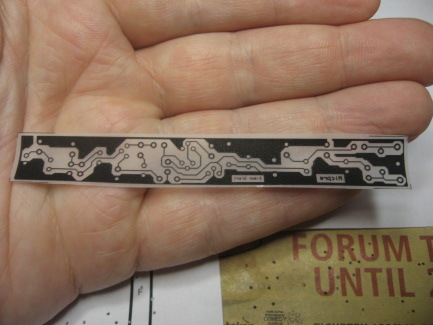 |
When exposing we try to position the board being exposed in a way the makes the UV illumination as even as possible. The only other precaution we must take is to ensure the photomask is flush against the board and can't move during exposure. Some suggest using special vacuum arrangements that hold the photomask on the board but I haven't found this necessary. Most methods use a glass pane to hold down the photomask on top of the board. Apparently some kinds of glass aren't totally UV transparent so to be on the safe side I use a piece of perspex, which seems to be totally UV transparent.
If this is the first time we are using this particular UV lamp and photoresist chemical combination we need to do a test exposure. Take a piece of scrap presensitised board and place some kind of photomask over it. Then place a piece of printer paper or some other UV opaque sheet so only a small part is exposed. In my case I chose 30 second brackets so I started the lamp and every 30 seconds moved the the paper along, each time exposing a bit more board until it was completely exposed. I then developed this board and the area that has the best contrast allowed me to determine the optimal exposure time. So long as we keep the lamp at roughly similar distance from the board we can always use this exposure time for every board of this type.
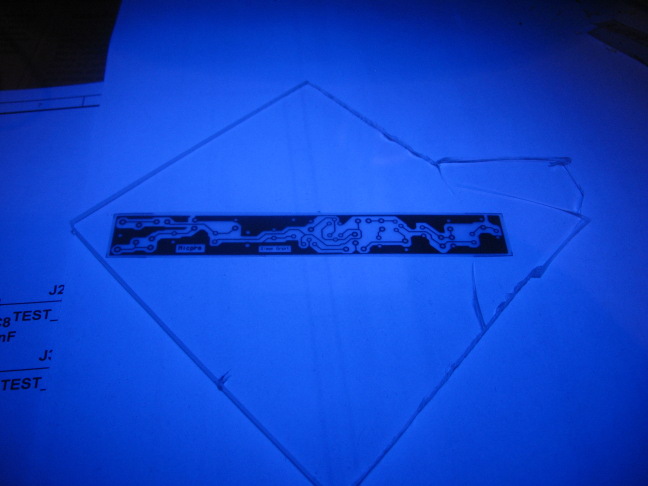 |
The above board is being exposed under the UV lamp, being held in place by a scrap piece of perspex. The reason everything looks blue is because the paper underneath is fluorescing and all the other lights are off. If you are going to watch the entire process it is probably a good idea to wear sunglasses.
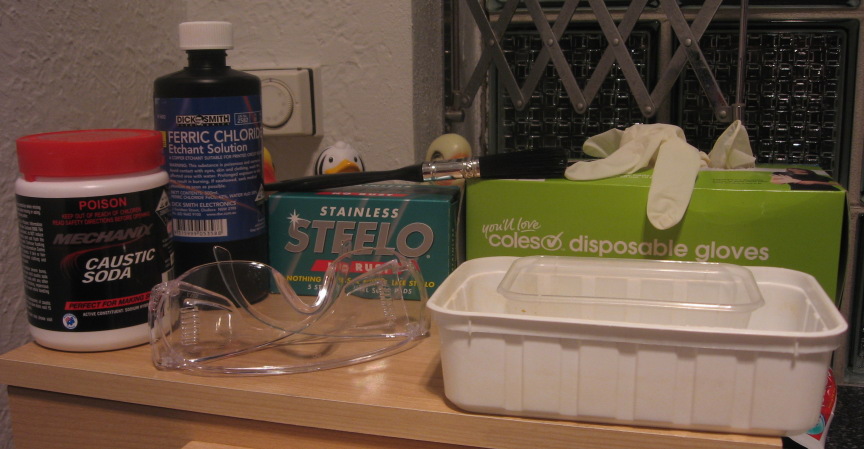 |
The above photo shows the typical implements of developing and etching boards. The rubber ducks in the background were not part of the experiment.
Once we have exposed the board we must protect it from further UV until we develop it. Boards are usually developed in an alkaline solution. For Riston® a special purpose solution is sold, however according to their website a developer can be made from a weak solution of sodium carbonate or potassium carbonate (see Wikipedia for common sources of these chemicals). Positive photoresists are commonly exposed in a caustic soda solution (sodium hydroxide). There are also alternatives in the form of universal developer. Many people recommend this and other solutions containing sodium silicate which supposedly acts as a buffer. I personally have had good results with using caustic soda alone, so long as one keeps a close eye on the the process. It is best to do the whole process somewhere that it is easy to cleanup that has access to running water such as a laundry. Needless to say it is best avoid UV sources until the board is developed.
The procesure for each is as follows, but always read the instructions that come with your particular kit. For Riston, mix the developer half and half with water in a shallow tray. If you have exposed properly with Riston you will generally find that the artwork is visible before it is developed. Remove the protective film, place the board in the solution and rock it back and forth. The unexposed areas will soften and turn to sludge as the develop may stick to the board, making it hard to tell when development is complete. This is why it is recommend you gentle brush the board with a soft paint brush, so this sludge will be wiped from the board. The areas exposed to UV will remain, and when all the unwanted resist is removed we rinse the board. I personally find it hard to judge when the process is complete. Too much exposure and you will lose some tracks when you rinse. But even more insidious is when a board looks developed but when you begin to etch you see a faint blue film on the unwanted copper. These areas will not etch so all that can be done is to place them back in the developer and try again, being careful not to overdevelop. This is not to say that Riston doesn't give excellent results, which many swear it does. When we are sure everything is alright we can etch properly.
And now for my favourite method, the positive photoresist. I make a solution fresh in the tray by tipping a small amount of caustic soda granules in the developing tray and adding water, then waiting for it to dissolve. It is probably more scientific to start with a stronger solution and then dilute it in the tray, but I never have to store or waste any solution this way, and I am pretty good at guessing the quantity. Never add granules while developing, as if they touch the board they will not only ruin the exposure but they will also attack the copper if strong enough. Always make sure all the granules are dissolved first. Due to its causticity, gloves and eye protecting are essential. Fairly soon the tracks will appear as the unexposed area is washed away. The coating is much thinner than Riston, and there is no sludgy precipitate. In this case we want to err on the side of underexposing, as if we overexpose we will lose our artwork very quickly. Even if there is still a hint of coating on the unexposed part this will often wash away when we rinse the board. If we find that the exposure is uneven across the board we can pick up the board (with gloves or plastic tongs) and dip only the underexposed part. When complete we proceed to etching. I have personally found this method easiest to master and boards made this way have superb resolution. As an example, my name appears on the board at the top of the first page. I have excellent eyesight but I struggle to read it, yet the letters are all perfectly formed. The artwork is only 12.5mm wide, and this was one of my earliest attempts.
| These boards are all failed attemps at developing using Riston. The first one was overdeveloped and had to be touched up by pen. It was not yet etched. The second one was discovered while etching to be badly underdeveloped, showing up as faint blue areas, so etching was abandoned half way through. The last was completely etched but when inspected revealed to be also slight underdeveloped. | 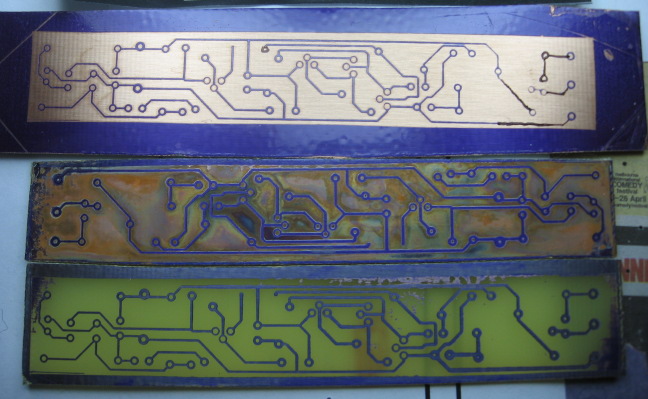 |
| This positive photoresist board was badly overdeveloped. As developing was taking a long time I added a few granules of caustic soda. These accidentally touched the board, overdeveloping it instantly. In fact the causticity seems to have attacked the copper itself. There are still some faint remnants of tracks left. | 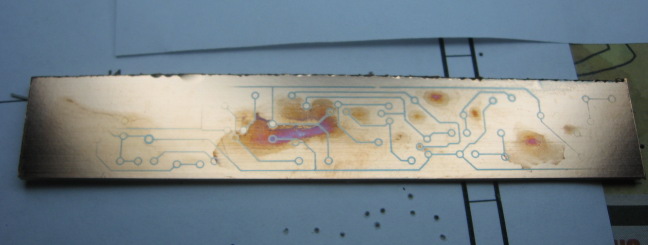 |
I won't say much here, plenty is said elsewhere. I would suggest using Ferric Chloride, even though it stains everything more or less permanently. To conserve it don't make the solution too strong but rather heat it by placing the etching tray in a sink or bowl of hot water (but not too hot!). If it is spent it will generally go from yellowy brown to greeny brown. If so just add some more. I have heard of some people mixing hydrochloric acid and hydrogen peroxide with water to make an etchant. They say this works well but I have not tried this, more info can be found in the links section. I would recommended doing your research as both chemicals are dangerous if mishandled. If you make a really big mess specialty stain removers exist form Ferric Chloride but they are exorbitant and you want to avoid a spill at all costs.
Once again, plenty of other people talk about this. I usually use a hobby rotary tool as a normal drill won't hold a 0.8mm wire drill bit. It is very hard to keep your hand steady and drill perpendicular. Make sure your PCB has drill holes left open so that when you etch you will end up with empty holes on the copper pads. This tends to help the drill centre itself as locating the drill exactly by hand is impossible. Recently I invested in a 0.8mm tungsten carbide drill with an 1/8 mm shank which allowed me to used a conventional drill press, and found this to be much easier, the holes being much more accurate. In Melbourne these drill can be purchased from Kalex. When done the remaining photoresist needs to be removed. The is a dedicated stripper for Riston but many people use steel wool or acetone. The positive boards can be stripped with acetone, alcohol or some other solvent for cleaning circuit boards. To protect the board until it is soldered coat the tracks with flux. There are special tin plating crystals but I have not tried this.
I hope this wordy overview of making PCB's hasn't turned you off making them in the method outlined. Once you get the hang of it the method is actually easier than it looks. Also with the improvements in resolution over cruder methods you will be able to design boards with smaller tracks and clearances, giving you greater flexibilty in you designs. At a later stage I will put up some method for people to send me feedback. This was meant to be a project to just create a webpage, but it has ended up being a large undertaking. More information will be put up soon, and corrections and tweaks will be made over time. Thanks for reading this far.